Design System Scope & Guidelines
Understanding the role of our design system: an interactive sandbox of UI building blocks, design tokens, and contextual pattern workflows — not a blueprint of live site pages.
What This Design System IS
Pattern Sandbox & Catalog- Atomic Component Showcase: Isolated buttons, badges, status chips, form inputs, dialogs, and typography tokens detailing all prop states & variants.
- Compound Layout Workflows: Contextual assemblies (form showcases, card grids, tabbed viewports, data tables) demonstrating how components interact visually.
- Interactive Sandbox: A testing area for responsive grid behaviors, accessibility, theme switching (light/dark mode), and animation micro-interactions.
What This Design System IS NOT
Not Live Site Page Specs- Not Live Site Page Mockups: Sections shown here are organized for component review, not as literal representations of live website pages or final page layouts.
- Not Production Data Contracts: Cards, forms, and tables utilize sample data to test visual spatial balance — not live database schemas or fixed content requirements.
- Not Venue or Council Statements: Contextual copy illustrates brand tone and layout flow, separate from operational venue licenses or legal disclaimers.
How to Interpret Sections & Components Below
Atomic sections (buttons, inputs, badges) demonstrate individual UI properties & states. Compound sections (form showcases, card grids, tabbed viewports, data tables) demonstrate spatial hierarchy and workflow UX. When building live site pages (`/`, `/markets`, `/traders`), consume these components as building blocks bound to real data and dynamic routes.
Bringing Vibrant Community Markets to Life Across the Region
From bustling weekend artisan stalls to professional market infrastructure & equipment hire — supporting local traders and thriving town centers since 2012.
02.0Brand Foundations & Design Tokens
Establishing Green Top Markets' core visual identity — brand color swatches, surface canvases, typography scales, line-height hierarchies, and CSS component architecture.
Brand Color System & Canvases
02.01 » Brand Color System & TokensEstablishing Green Top Markets' visual design language — combining iconic emerald green tones with warm craft backgrounds, gold heritage accents, and clear readable typography.
02.01.01 » Core Brand Swatches & Tokens
Brand Core & Accent Colors
4 Core SwatchesBrand Primary
--color-gt-greenUsed for main headers, primary CTA buttons, and dominant section blocks.
Deep Shade
--color-gt-green-darkUsed for hover states, dark header bands, and high-contrast elements.
Heritage Accent
--color-gt-goldUsed for badges, featured highlights, stars, and luxury accents.
Gold Deep Tone
--color-gt-gold-darkUsed for gold border outlines, dark mode accents, and active focus rings.
Background & Surface Canvases
Brand Primary Canvas
.section-block--emeraldPrimary brand background surface for high-impact callouts, emerald section blocks, and primary brand banners.
Deep Shade Canvas
--color-gt-green-darkDeep green background surface for high-contrast hero banners, dark header bands, and active brand strips.
Light Main Canvas
--color-gt-creamPrimary warm artisan canvas for public website pages and light section backgrounds.
Dark Main Canvas
--color-gt-darkUsed for dark mode page backgrounds, rich website footers, and modal backdrops.
Light Card Container
bg-card / bg-whiteStandard container background for cards, tables, modal dialogs, and form panels.
Dark Container Surface
dark:bg-[#18221A] / bg-cardElevated card background in dark mode, popover panels, and dark drawer menus.
Text & Content Colors (Typography Hierarchy)
#0F1912Chepstow High Street Market
High-contrast primary heading and body text for light mode canvas.
Used for titles, primary body paragraphs, table values, and main readable copy.
#475569Every 2nd & 4th Sunday • 10am - 3pm
Subtitles, timestamps, field helpers, and secondary metadata.
Used for secondary text, metadata, form instructions, and table header labels.
#FAF7F2 / #FFFFFFFriars Walk Artisan Market
High-contrast text rendered over dark green buttons & dark backgrounds.
Used for text over emerald green backgrounds, dark header bars, and dark mode pages.
#1B6C17SECTION 01 • ARTISAN FOODS
View All Pitch Allocations →
Used for section kickers, interactive links, brand emphasis text, and highlights.
#D4AF37★ Featured Artisan Trader
SPECIAL EVENT LICENSE APPROVED
Used for kickers on dark backgrounds, featured highlights, star ratings, and gold text.
Contextual & State Colors
Approved stalls, active markets, verified badges.
Pending applications, low marquee inventory, upcoming deadlines.
Cancelled bookings, sold out markets, error states.
Market guidelines, informational notices, trader tips.
Past market records, inactive states, subtle borders.
Typography Scale & Component Architecture
02.02 » Typography & Component RulesStandardizing typography fonts, line-height hierarchies, and clear component naming so pages are fast, readable, and easy to maintain.
1. Typography Scale & Fonts
Playfair / Georgia
Conveys heritage, community trust, and artisanal quality. Used for page titles, section headers, and hero headlines.
Inter / System Sans
Modern, crisp, highly legible UI typography for body copy, form labels, card details, and interactive tables.
Geist Mono / Courier
Used for technical asset IDs, equipment specifications, pricing codes, and developer reference snippets.
2. Component Styling Rules & Structure
We organize our CSS styles using structured BEM (Block, Element, Modifier) rules so every button, card, and header stays consistent, responsive, and maintainable across the entire website.
The standalone component wrapper.
.section-block.card-traderChild elements within the block.
.section-block__header.card-trader__avatarVariations or theme states.
.section-block--emerald.card-trader--featured03.0Primitive Controls & Action Triggers
The fundamental atomic building blocks — primary & secondary action buttons and contextual status badges.
Contextual Status Badges
03.02 » Contextual Status BadgesColor-coded status badges that convey status, pitch availability, trader hygiene scores, or sustainability highlights at a glance.
How Status Badges Work
1. At-a-Glance Clarity
Provides clear, high-contrast visual cues for key details so visitors and traders don't have to search for critical status information.
2. Ideal Uses
Market status indicators (Active, Sold Out), trader hygiene ratings (5/5 Verified), pitch availability counts, and eco-packaging highlights.
3. Clear Placement
Embedded neatly inside market cards, table rows, and page headers so users can scan through lists quickly and effortlessly.
Badge Variant Suite
Collection of standardized badge variants designed for Green Top Markets status and category labels.
04.0System Feedback & Operational Announcements
Components for operational alerts (adverse weather cancellations, venue relocations), toast popups, action modals, alert confirmation boxes, slide-out drawers, and skeleton loading pulses.
Operational Alert & Announcement Banners
04.01 » Modular Notice & Marketing BannersModular compound components for critical operational alerts (adverse weather cancellations, venue relocations) and top-of-page sitewide marketing announcements.
Notification Cards (Toast System)
04.02 » Toast NotificationsGentle pop-up notifications that inform you of progress, booking confirmations, or status updates without stopping you from continuing your work on the page.
How Notification Toasts Work
1. Gentle & Non-Disruptive
Toast messages float gently onto the screen to confirm an action (like booking a pitch) without locking the screen or interrupting what you are doing.
2. Clear Color Coding
Green for success (e.g. pitch confirmed), Amber for stock warnings (e.g. 3 gazebos left), Red for urgent compliance alerts, and Blue for helpful reminders.
3. Automatic & Manual Dismissal
Standard updates fade away automatically after 4–5 seconds. Critical alerts stay visible until you click the cross (X) button to confirm you've read them.
Test Notification Triggers
Click the buttons below to trigger live notification toasts and see how each message type behaves on screen.
Pop-Up Dialog Windows (Modals)
04.03 » Modal Action DialogsFocused pop-up windows that let visitors or traders quickly review details, inspect summaries, or complete short forms without losing their place on the main page.
How Pop-Up Dialogs Work
1. Focused Task View
Presents important content in a clean window over the page, keeping your full attention on the task without taking you away from where you were.
2. Ideal Uses
Trader pitch application previews, document checks, terms & conditions confirmation, and quick feedback forms.
3. Easy Closing
Simple to close whenever you're finished — click the 'Cancel' or cross button, click anywhere outside the box, or press the ESC key.
Trader Application Quick Preview
Click the button below to open a sample pop-up window and see how structured information is presented to the user.
Action Confirmation Windows (Alert Dialogs)
04.04 » Destructive Alert DialogsImportant confirmation boxes that ask for your explicit confirmation before completing significant actions — like cancelling a pitch booking or deleting an item.
How Confirmation Alerts Work
1. Prevents Accidental Mistakes
Briefly interrupts your flow to ask for confirmation before processing important or non-reversible actions, ensuring nothing is done by accident.
2. Ideal Uses
Cancelling pitch reservations, stepping away from unsaved multi-step forms, or confirming booking changes.
3. Explicit Choice Required
Requires you to click an explicit button choice ('Keep Reservation' or 'Yes, Cancel') so the outcome is always intentional and crystal clear.
Stall Booking Cancellation Alert
Click the button below to trigger a sample confirmation window and test how explicit action choices prevent accidental cancellations.
Slide-Out Side Panels (Drawers)
04.05 » Sheet Drawers & Slide-Over PanelsSlide-out side panels that open smoothly from the edge of your screen. Perfect for viewing your equipment hire basket, adjusting market filters, or reading quick guides without leaving your main view.
How Slide-Out Drawers Work
1. Convenient Side Workspace
Slides smoothly out from the edge of your screen, giving you extra workspace for secondary tasks (like reviewing hired gazebos) without opening a new page.
2. Ideal Uses
Equipment hire shopping baskets, multi-option market search filters, trader document upload vaults, and mobile site navigation.
3. Smooth & Easy Dismissal
Features a fixed top header and bottom total calculation bar. Easily close the drawer anytime by clicking outside or pressing ESC.
Equipment Hire Cart Drawer
Click the button below to slide out a sample equipment basket panel with daily hire rates and checkout button.
Empty States & Skeleton Loaders
04.06 » System Feedback StatesStandardized UI patterns for zero search results, unallocated pitch grids, and skeleton pulse loaders to maintain high UX clarity and brand warmth during asynchronous data fetching.
Skeletons utilize warm cream and dark emerald-tinted pulses with subtle gold borders to avoid cold wireframes during asynchronous queries.
05.0Editorial Content & Storytelling Modules
Pre-designed editorial text layouts, key-fact callout cards, and side-by-side text & image story blocks for community stories and venue highlights.
Single-Column Reading Layout
05.01 » Simple Editorial Text BlockClean single-column text layout designed for effortless reading — perfect for market charters, community announcements, and editorial stories.
Green Top Markets operates on a foundation of local empowerment, transparency, and economic resilience for small-batch food producers and craft artisans across South Wales.
Every market section component is engineered using flexible layout wrappers, ensuring consistent spacing, full content width alignment, and clean responsive layout across mobile, tablet, and desktop screens.
w-full max-w-none) to maintain crisp left alignment with site headers and card grids.Whether displaying administrative terms, hygiene compliance notes, or community notices, text blocks maintain high contrast against backgrounds, span full content width, and respect the brand font hierarchy.
Text & Fact Card Layout
05.02 » Text & Fact Callout CardsA balanced 2-column layout combining detailed operational copy on the left with a highlighted key-facts summary card on the right.
Ensuring High Visual Standards & Operational Safety Across South Wales
Green Top Markets partners with local councils, venue license holders, and independent makers to deliver turn-key artisan markets in Chepstow, Newport, Porthcawl, and surrounding regions.
To maintain public safety and brand consistency, all markets utilize uniform heavy-duty 3m × 3m green gazebos with commercial leg ballast weights. Pitch allocations follow a strict 55-day rolling reservation window to prevent pitch hoarding and maintain diverse product categories.
All food vendors must hold a minimum 4-star local authority rating and provide £5M Public Liability Insurance documentation prior to setup. Hot food vendors must use compostable packaging under our zero-plastic initiative.
On-site operations are managed by dedicated Green Top market marshals who handle power distribution, trader loading schedules, and continuous wind speed monitoring.
Text & Image Section Layout
05.03 » Text & Image Split SectionsA side-by-side layout combining engaging story text with high-quality photography — ideal for venue showcases, artisan trader highlights, and council partnership features.
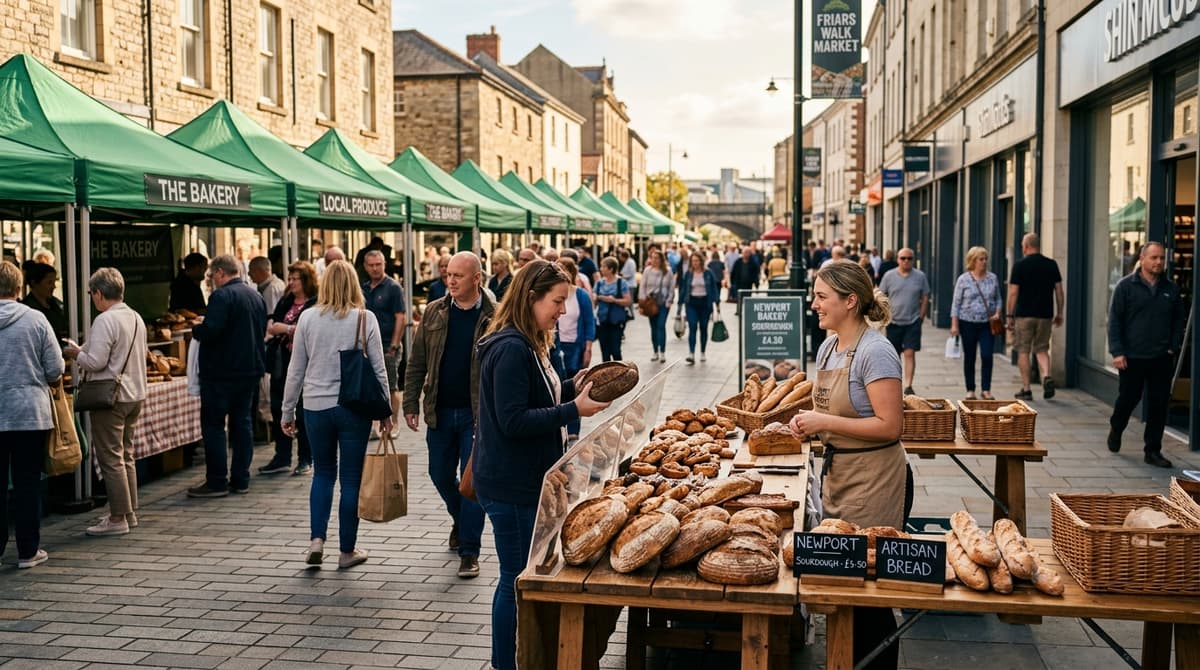
Revitalizing Newport High Street Through Weekly Artisan Fairs
In partnership with local authorities, Green Top Markets transformed Newport’s historic market square into a vibrant weekend destination featuring over 45 independent traders.
- Average 3,500+ visitor footfall every Saturday
- 100% waste diversion & eco-friendly packaging rules
- Power distribution & Gazebo setup managed on-site
06.0Composite Cards Component Suite
Primary container molecules combining typography, badges, images, and action buttons into cards for market locations, equipment hire packages, trader showcases, and metric highlights.
Distinctive Card Layout Systems
06.01 » Composite Cards SuiteCards are organized into distinct, modular feature components — each tailored for its specific domain content type (upcoming events, pitch allocations, trader testimonials, equipment hire, news stories, photo galleries, and stat counters).
Upcoming Event & Location Cards
Designed for market discovery feeds and town location hubs. Features top photography with 3:2 aspect ratio, date and location badges, event title, stall availability counter, and pitch booking button.
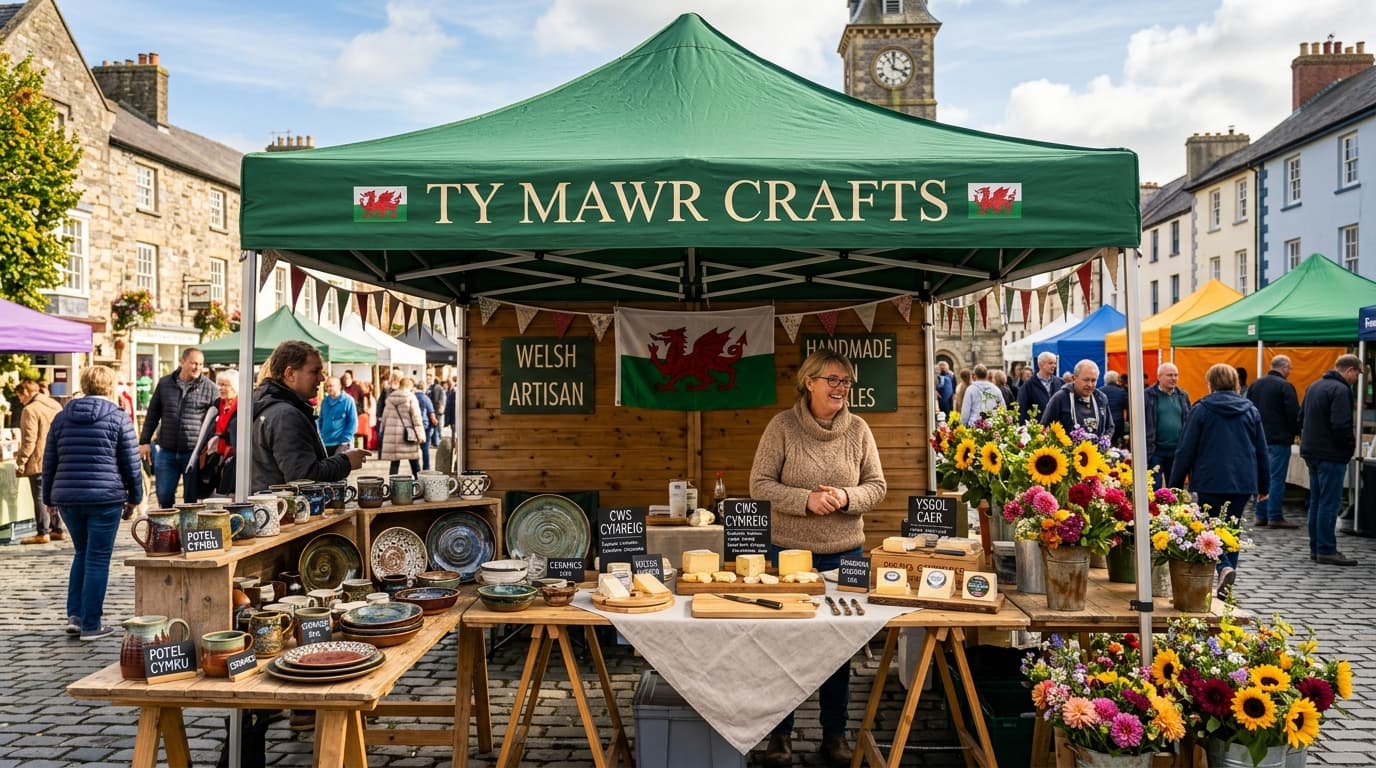
Abergavenny Autumn Gourmet Market
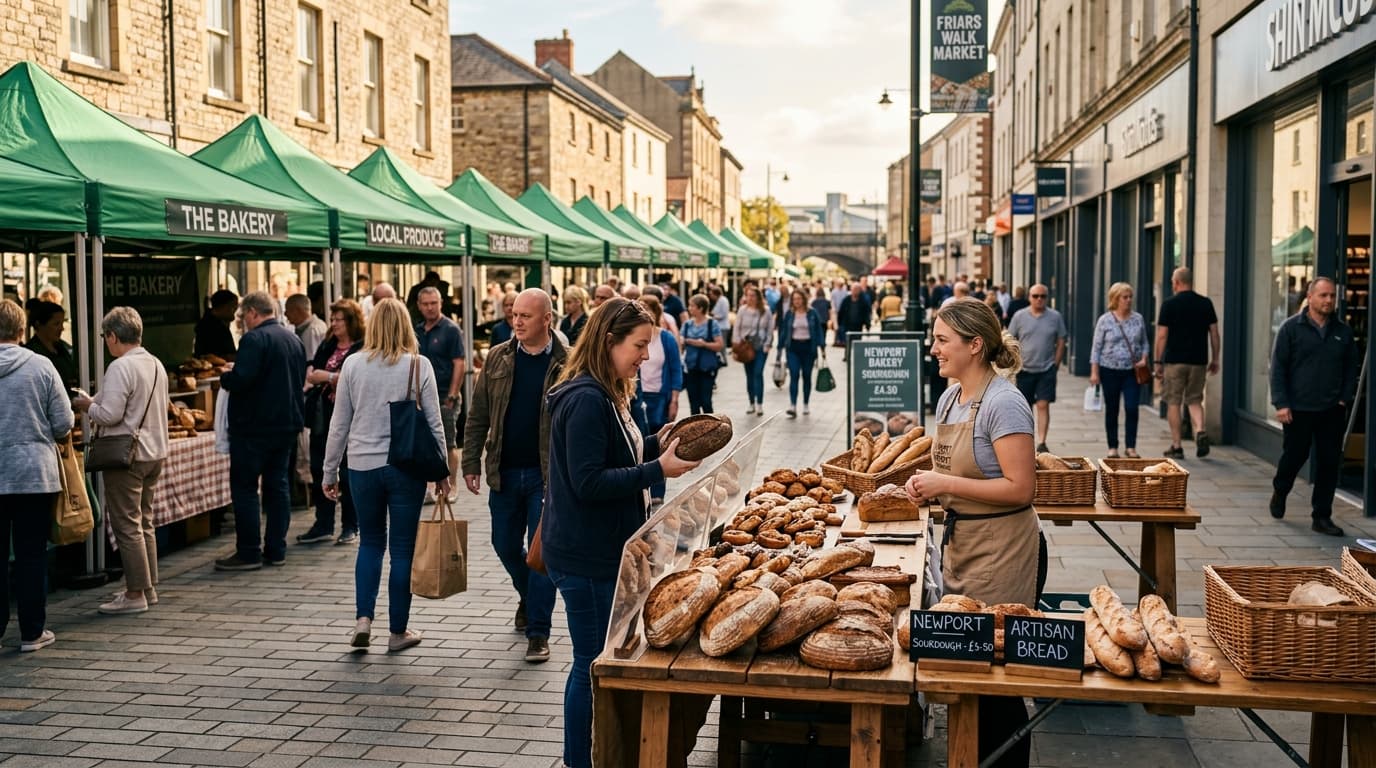
Chepstow Town Centre Harvest Fair
Friars Walk Newport Street Food Fest
Trader & Community Voices Testimonial Cards
Consolidated testimonial card design celebrating real trader stories, visitor reviews, and community feedback. Features stylized quote iconography, authentic quote body, avatar with verified badge, and location/market tag.
Equipment Hire Spec Cards
Tailored for equipment hire inventory (3x3m green gazebos, heavy leg weights, trestle tables, power generators). Features 3:2 photography, day & weekend hire rates, specification checklists, and hire request actions.
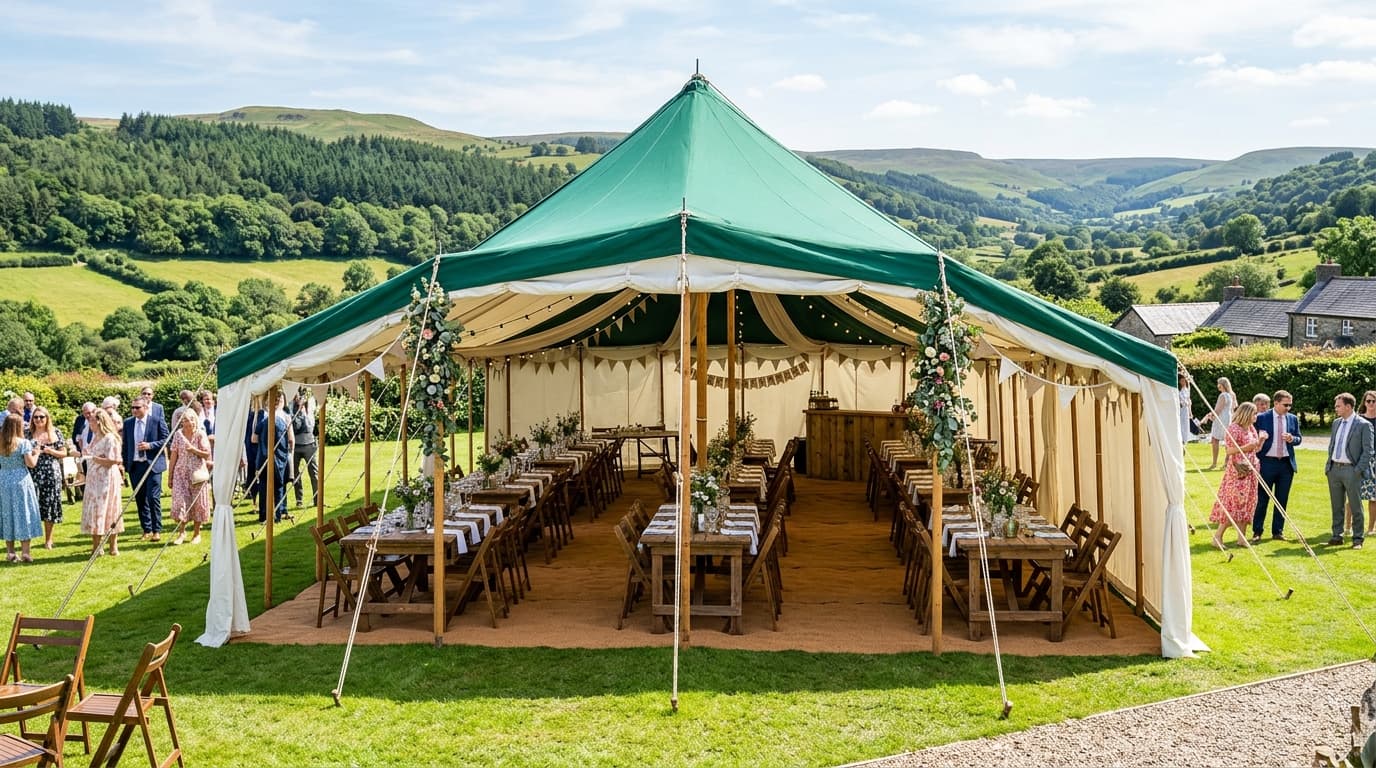
3x3m Heavy-Duty Green Market Gazebo
- Waterproof 500D PVC Coated Canopy
- Includes 4x 15kg Cast Iron Leg Weights
- Erected & Dismantled by On-Site Crew
6ft Heavy-Duty Folding Trestle Table
- High-Density Polyethylene Top
- Holds Up to 150kg Uniform Load
- Includes Heavy Linen Table Skirt
16A Weatherproof Power Distribution Box
- RCD Protected Outdoor Sockets
- Includes 20m Extension Cable Reel
- Safety Certified & PAT Tested
Community Impact & News Story Cards
Crafted for sustainability updates, council partnership news, and market impact stories. Features topic pill badge, estimated read time, headline, summary text, team attribution badge, and "Read Story" action.
Zero Single-Use Plastic Mandate Achieved Across All 2026 Markets
South Wales Young Trader Grant Scheme Announced for Spring
Caldicot Castle Festive Market Attracts Record 8,000 Visitors
Full-Bleed Image Background Cards
Featured in Section 15 Carousel Sliders. The photography serves as the full card container background, overlaid with dark gradient protection, top gallery badges, active stall counter chips, location metadata, and title overlay text.
Newport Market Square
Artisan Bakery & Local Preserves Row
Chepstow Riverfront
Ceramics & Woodwork Artisan Pavilion
Abergavenny Showground
Commercial Gazebo & Infrastructure Hub
Impact Stat & Metric Cards
Designed for high-impact metric highlights, council partnership reports, and pitch conversion stats. Features both detailed content stat cards and compact key impact indicator cards.
Pattern 06A • Detailed Metric Spotlight Cards
Active Regional Artisan Traders
Annual Market Footfall
Trader Re-Booking Rate
Pattern 06B • Compact Key Impact Indicator Cards
Across South & West Wales
Artisans, bakers & growers
Direct regional spend
Compostable packaging policy
07.0Search & Discovery Engine
Dedicated search & discovery workflows — featuring interactive multi-select category filter chips and a unified hero search bar building directly on multi-category tag filtering.
Interactive Category Filters (Tag Chips)
07.01 » Filter Chips & Tag SelectionInteractive filter buttons that let visitors tap or click to filter markets by produce category — like Artisan Bakery, Organic Produce, or Street Food.
How Category Filters Work
1. Real-Time Filtering
Allows visitors to filter stall listings or market directories instantly with a satisfying tap or click.
2. Ideal Uses
Filtering produce categories (Artisan Bakery, Street Food, Pottery), location options, and upcoming dates.
3. Clear Active States
Active selected tags highlight in solid green with a small cross (X) to remove, while unselected options remain light gray.
Category Filter Chips
Click any category chip below to toggle filter selection in real-time.
Market Directory Search Engine
07.02 » Integrated Multi-Category Search EngineA unified search layout building directly on multi-select category filter chips — allowing visitors and traders to search upcoming artisan markets by town, keyword, or multiple product categories simultaneously.
08.0Form Elements & Application Workflows
Key form element primitives — text inputs, radio groups, custom & native selects, comboboxes, switches, and toggle button groups — followed by a complete trader booking application form.
Key Form Control Primitives
08.01 » Essential Input & Selection ElementsA dedicated showcase of atomic form elements — including inputs, radio groups, comboboxes, custom selects, native selects, toggle switches, and toggle button groups aligned to brand design tokens.
Mandatory for continuous wind gusts >20mph
Comprehensive Input & Selection Form Suite
08.02 » Trader Pitch Application Workflow FormAn easy-to-use form suite for trader registrations and equipment quotes — complete with text inputs, dropdown menus, radio choices, toggle switches, and checkboxes.
09.0Interactive Layouts & Navigation
Interactive user interface elements — collapsible FAQ accordions, image & testimonial carousels, and multi-tabbed layout viewports.
Interactive FAQ & Accordion Component
09.01 » Collapsible Accordions & FAQ Feature ComponentA reusable, data-driven FAQ feature component styled directly with Green Top Markets brand design tokens (`gold-tint`, `emerald`, `dark-heritage`, `default`). Supports fallback JSON datasets, database pre-fetches, and category filtering.
1. Warm Gold-Tint Theme (`variant="gold-tint"`)
General FAQs2. Deep Forest Emerald Theme (`variant="emerald"`)
Filtered by `category="trader"`3. Obsidian Dark Heritage Theme (`variant="dark-heritage"`)
Filtered by `category="hire"`4. Standard Neutral Card Theme (`variant="default"`)
Filtered by `category="visitor"`Carousel Component Patterns
09.02 » Interactive Card & Image CarouselsInteractive sliding galleries that let users swipe or click navigation arrows to browse through market photography, equipment setups, and trader reviews.
1. Image-Heavy Market Gallery Slider
Showcasing high-resolution photography of market locations and stall setups.
Newport Market Square
Artisan Bakery & Local Preserves Row
Chepstow Riverfront
Handcrafted Ceramics & Woodwork Pavilion
Abergavenny Showground
Weather-Proof Equipment & Gazebo Village
Chepstow Riverfront
Artisan Bakery & Local Preserves Row
Chepstow Riverfront
Artisan Bakery & Local Preserves Row
Chepstow Riverfront
Artisan Bakery & Local Preserves Row
2. Text-Heavy Testimonial Cards Slider
Highlighting community stories, trader feedback, and rating cards.
Tabbed Layouts & Segmented Views
09.03 » Tabbed Navigation & Content PanelsVersatile tabbed interfaces for switching between views without page reloads. Includes tabs, pills, and line styles.
This component is used to organise related content into logical groups but none of the examples are representitive of any existing or future layouts or content of a live, working part of the Green Top website.
Chepstow High Street Farmers Market
Friars Walk Newport Street Food Market
Porthcawl Promenade Artisan Fair
Chepstow High Street Market — Pitch #14
Confirmed • Sunday 12 Oct 202610.0Public Data Views & Directory Tables
High-density tabular data views for market schedule directories, equipment hire price sheets, and public trader listings with sorting and pagination.
Organized Data & Directory Tables
10.01 » Public Directory & Schedule Data TablesOrganized tables for displaying market schedules, trader directories, and equipment inventory — featuring interactive column sorting, instant text search, and action menus.
1. Simple Data & Status Table (Market Locations)
| Code | Market Venue | Region | Operating Frequency | Traders | Status |
|---|---|---|---|---|---|
| MKT-01 | Newport High Street | South East Wales | Weekly (Sat) | 45 Stalls | Active |
| MKT-02 | Chepstow Riverfront | Monmouthshire | Fortnightly (Sun) | 32 Stalls | Active |
| MKT-03 | Abergavenny Market Square | Monmouthshire | Monthly (1st Sat) | 55 Stalls | Active |
| MKT-04 | Caldicot Shopping Center | South East Wales | Weekly (Thu) | 28 Stalls | Active |
| MKT-05 | Monmouth Agincourt Square | Monmouthshire | Seasonal (Autumn) | 40 Stalls | Upcoming |
2. Avatar & Rich Data Table (Registered Trader Directory)
| Trader & Business | Produce Category | Primary Contact | Member Since | Verification |
|---|---|---|---|---|
VB Valley Sourdough Bakery TRD-101 | Artisan Bakery | Rhys Bevan | Jan 2014 | Verified Hygiene 5/5 |
GC Gwent Valley Creamery TRD-102 | Cheese & Dairy | Fiona Morgan | Mar 2017 | Verified Hygiene 5/5 |
CO Caldicot Organic Farm TRD-103 | Organic Produce | Gareth Evans | Sep 2019 | Verified Hygiene 5/5 |
WA Welsh Artisan Ales TRD-104 | Craft Beverages | William Parry | May 2021 | Verified Hygiene 5/5 |
MH Monmouth Honey & Beeswax TRD-105 | Preserves & Honey | Nia Davies | Nov 2022 | Pending Audit |
3. Interactive Controlled Table (Equipment Inventory)
| SKU | Category | Available | Status | Actions | ||
|---|---|---|---|---|---|---|
| EQ-1001 | 3m x 3m Heavy Duty Gazebo | Marquees | £45.00 / day | 35 Units | In Stock | |
| EQ-1002 | 16A Silent Diesel Generator | Power | £65.00 / day | 12 Units | In Stock | |
| EQ-1003 | 6ft Wooden Trestle Table | Furniture | £10.00 / day | 80 Units | In Stock | |
| EQ-1004 | Folding Metal Market Chairs | Furniture | £4.00 / day | 150 Units | In Stock | |
| EQ-1005 | 32A Power Distribution Box | Power | £40.00 / day | 4 Units | Low Stock | |
| EQ-1006 | 6m x 3m Double Marquee Canopy | Marquees | £85.00 / day | 2 Units | Low Stock |
11.0Site Frame & Navigation Footers
Footer navigation architecture, social links, legal disclaimers, and newsletter alert sign-up modules.